 November 6, 2026
All Health, Physical Education, and Lifetime Wellness Teachers will receive training on Vaping Education. November is Vaping Education Month. We will have an Elementary Training and a Middle & High School Training. Teachers will have the knowledge and confidence to inspire and motivate students not to engage in Vaping.
- # 92199 HPELW- MSCS Vaping Health Education Middle & High: 4 p.m. Tuesday, Nov. 10, 2026 (Virtual)
MSCS Escape the Vape & Playbl MS & HS
- # 92197 HPELW- MSCS Vaping Health Elementary Education: 5 p.m. Tuesday, Nov. 10, 2026 (Virtual)
MSCS Escape the Vape Elementary
The Health Education Vape Training will equip all HPELW teachers with a clear understanding of the instructional materials and guidance associated with Vaping Education. During the session, teachers will receive an overview of the MSCS district‑developed PowerPoint presentations for grades K-2, 3-5, and 6-12, along with the Vape Pledge, Vape Content Engagement Activity Sheet, and Vape Goal Setting.
For questions, contact:
- Jeremiah Bland – Blandj@scsk12.org (HPELW Instructional Advisor)
- Jim Harbin – Harbinj1@scsk12.org (HPELW Instructional Advisor)
- Dr. Rahmod Traylor – Traylorr@scsk12.org (HPELW Manager)
Principals, come and learn how your students can be part of the St. Jude Kids Fun Run during the St. Jude Memphis Marathon Weekend! In partnership with HPELW, Ellie Erickson, director of the Kids Fun Run, will share more about this iconic Memphis event, the impact it makes for St. Jude kids and families, and the special experience it can create for your students. Plus, you’ll have a chance to ask questions and get resources to help your school get involved!
The Kids Fun Run is Saturday, Dec. 5, at 1 p.m. Registration is $25 per student and FREE for participating parents! Kids will receive a race shirt and medal, plus access to food and fun at the post-run party after the race.
· St. Jude Fun Run Meeting (Virtual): Thursday, Nov. 12, 4:30-5:15 p.m.
For questions, contact:
· Ellie.Erickson@alsac.stjude.org
· Jeremiah Bland – Blandj@scsk12.org (HPELW Instructional Advisor)
· Jim Harbin – Harbinj1@scsk12.org (HPELW Instructional Advisor)
· Dr. Rahmod Traylor – Traylorr@scsk12.org (HPELW Manager)
Principals, please review this week's edition of MTSS Lead Weekly Updates.
Looking to build stronger partnerships that make a lasting impact on your school or department? Join the Office of Partnerships and Development for an engaging Lunch & Learn professional development session!
Course: Understanding Partnerships and Development (PLZ #92684)
Date/Location: Thursday, December 3, 2026, Frances E. Coe Administration Building Auditorium
Time: 10:30 a.m. – 12 p.m.
During this session, participants will gain valuable insight into the processes and procedures of the Office of Partnerships and Development, including how to identify and secure various levels of partnerships, cultivate meaningful relationships, and maintain strong partnerships that support student and school success.
Ready to strengthen your partnership-building skills for your school or department? Register today through PLZ using Course #92684!
We look forward to learning, collaborating, and building stronger partnerships together!
Based on a new Tennessee law (Tenn. Code Ann. § 49-6-3050), schools are required to provide notice on their website when administering a preparatory college entrance exam including the PreACT. Also, based on the law, “A public school shall allow a home school student to take an advanced course or preparatory college entrance examination offered by the public school if space is available.”
The MSCS Communications Office will be posting a message on your school’s website indicating that the District is administering the PreACT and PreACT 8/9 through November 20, and that a home school parent should contact their student’s school if they want their student to take the PreACT. If you are contacted by a parent regarding the PreACT, please reach out to our department (Assessment and Accountability: 901-416-5450 or assessment@scsk12.org), and we will work with you on the logistics including locating a device that the student would use for testing.
TN Portfolio Access & Collections
All Portfolio educators should log in to TeachAll as soon as possible to verify access to the platform. A State Single Sign-On (SSO) account is required to log in and use the system.
- Additional information about platform access may be found in the TNPortfolio Teacher Manual.
Point A Assessments
Portfolio Educators should ensure all point A assessments are completed for all students by Friday, December 4.
- To support purposeful sampling, work should NOT be uploaded to the platform.
- See page 5 of the TEAM Portfolio Guidebook for Administrators and Teachers for more information on purposeful sampling.
The deadline to complete TEM New Observer Certification is Tuesday, March 30, 2027. Administrators pursuing TEM certification for the first time can register for the course below:
- Self-Paced Canvas Course PLZ Course #50074
For questions or support, please reach out to eps@scsk12.org.
Evaluation tracks will be updated and visible in PLZ by Friday, November 6, 2026. Evaluation tracks will reflect educators' SY25-26 LOE (Level of Overall Effectiveness) scores from TN Compass.
- Proficient Track: LOE of 3, 4, or 5
- Focus Track: LOE of 1 or 2
- Novice Track: No prior year LOE
Questions about evaluation tracks should be sent to EPS@scsk12.org
2025–26 Educator Level of Overall Effectiveness (LOE) Score Release
The Tennessee Department of Education (TDOE) released 2025–26 Educator Level of Overall Effectiveness (LOE) scores in TNCompass on October 30, 2026.
To receive an LOE score, all required evaluation component scores must be available in TNCompass. The required components may include:
- Observation
- Achievement
- Growth
- Professionalism
- Student Perception Survey
Please note: Educators designated in TNCompass as a Partial Year Exemption (PYE) are not eligible to receive an LOE score and will not have an LOE displayed in TNCompass.
**As a reminder, the administrators should not mark “Educator is unable to sign.”
If you have questions about missing component scores or other evaluation-related concerns, please submit an Ivanti ticket. The Employee Performance & Support (EPS) team will review and research the issue.
**All SY25-26 evaluations should be finalized and signed with PIN in TNCompass by December 11, 2026.
Growth & Achievement containers are now reopened for educators who transferred schools or were hired after the containers initially closed. The containers will close Friday, November 20.
Educators who did not make G & A selections during the initial window may also make selections during this time.
If you have questions, please reach out to Employee Performance and Support by telephone: 901-416-2475 or email: eps@scsk12.org.
The deadline to complete NIE Goal Setting Conferences has been extended to November 6, 2026.
IMPORTANT: NIE Employees must select their evaluator first in PLZ, in order for the evaluator to have access to their NIE plan. In addition, the evaluator must be NIE Certified.
Questions? Contact EPS@scsk12.org
Are you ready to deepen your understanding of the Professionalism Rubric? Join this session to analyze evidence, reflect on your professional practice, and use the rubric to support continuous professional growth. Designed for teachers already familiar with the Professionalism Rubric.
When: Thursday, November 12, 2026, | 4–5 p.m.
Register in PLZ: Course #50664
Questions? Contact EPS@scsk12.org
The Fall Student Perception Survey runs October 26-November 6, 2026. The District’s goal is 95% or greater completion among eligible students and teachers. Teachers should work with their Survey Site Coordinator to ensure students have the time, technology, and support to participate.
Questions? Contact Employee Performance and Support at 901-416-2475 or eps@scsk12.org, or LaToya Rogers at rogersld@scsk12.org.
For RETURNING NIE Evaluators that were previously NIE Certified during SY2025-2026, NIE Recertification is NOT REQUIRED for SY2026-2027. Eligible Returning NIE Evaluators will be automatically identified and added as NIE Evaluators in PLZ for SY2026-27.
NEW NIE Evaluators, please register in PLZ for Course #50057.
The deadline to complete certification and certify as an NIE Evaluator for SY26-27 is April 9, 2027.
Questions? Contact EPS@scsk12.org
Session Title: Strategic School Marketing: Driving & Sustaining Student Enrollment
Facilitators: Dr. Daniel L. Jack (Director) & Zonja Glover (Principal)
Date: November 12, 2026
PLZ Registration Code: 93238
Why Marketing Matters for School Leaders
In today’s educational landscape, understanding the leadership of marketing is a non-negotiable strategy for long-term school success. A school’s narrative shouldn't be left to chance. To sustain and grow enrollment, leaders must intentionally define their school’s unique value proposition, tell their story with clarity, and build lasting trust within their communities.
Session Architecture & Delivery Model
- Session Overview: Learn how to leverage your school’s unique strengths to build a high-impact narrative that resonates with families and prospective students across your community.
- Key Outcome: Walk away with actionable strategies to identify your core assets and build a targeted marketing and communication plan that drives enrollment.
The "Present, Model, Practice, Execute" Framework:
- Present: Core principles of educational marketing, defining target audiences, and shaping compelling school narratives.
- Model: Real-world case studies showcasing how data and storytelling were leveraged to launch successful social media and community outreach campaigns.
- Practice: Hands-on collaborative drafting of your school’s unique value proposition and targeted messaging for parent newsletters or social media.
- Execute (Implementation Plan): Produce a concrete two-paragraph value narrative to align and deploy with your campus leadership team.
👉Secure your spot in PLZ using Code 93238!
Daniel L. Jack, Ed.D.
Performance and Leadership Development
Greetings, Principals.
Teachers must complete their required Flex Day courses by November 11, access their PLZ transcripts beginning November 13, and submit their transcripts to you to verify eligibility for time off November 23-25, 2026.
Please review submitted transcripts to confirm that teachers completed the required professional learning hours.
Thank you for your support.
The November Mindset of the Month is We are Connected. The We are Connected Mindset helps us understand that everyone who comes into our lives can assist us in living our dream. Through this Mindset, we will learn to constantly explore synergies with others, embrace diversity, and relish healthy competition, allowing us to maximize our potential.
This week, November 2-6, 2026, our focus is on Lesson 3.1: Embrace Everyone. Every person who comes into your life has the potential to help you, hurt you, or have no impact on you at all. Next week, November 9-13, 2026, our focus will be Lesson 3.2: Maximize Positive Relationships. There are people in life who can lift you up and make you better. Unfortunately, there are also people who can bring you down. Work to spend more time with people who empower you.
SEL Monthly Toolkit: Click Here to gain access to resources connected directly to the Mindset of the Month and additional resources.
Need one-on-one support with 7 Mindsets implementation? Have 7 Mindsets questions?
Reach out to Advisor Aunia Cole at coleal@scsk12.org, Advisor Chunmeka Wayne at waynecc@scsk12.org, or SELhub@scsk12.org.
As part of MSCS' continued district-wide RTI2-B implementation, please ensure that your school's RTI2-B Monthly Meeting Minutes are completed and submitted by the last Friday of each month.
Meeting minutes should clearly document your school's team participation, data reviewed, student interventions/supports, decisions made, and next steps. Consistent documentation helps us monitor implementation and provide appropriate support to schools.
Thank you for your continued leadership and commitment as we work together to decrease suspensions, increase attendance, and strengthen school culture and climate. The submission link for the RTI2-B Monthly Meetings is below.
If you need additional assistance, please contact RTI2-B Advisors: Michael Spearman (spearmanmt@scsk12.org) 901-416-0608 (desk) or Clarence Shaw (shawcj@scsk12.org) 901-416-4173.
Click HERE to access the MSCS Leadership Launchpad.
Click HERE to access the RTI2-B Monthly Meeting Minutes Template.
The first 7 Mindsets Insights Measurement Window opened October 19, 2026, and will close November 13, 2026. Insights provides schools with valuable information to better understand student social-emotional strengths and areas where additional support may be needed.
Measurement Window: October 19, 2026 – November 13, 2026
Student Access
Students will access Insights by selecting the 7 Mindsets app from their Clever dashboard. Students in grades 6-12 may see a home screen and should select “Start Measurement.”
Students will then confirm their identity, select English or Spanish, complete a brief audio check, and begin the measurement. Headphones are required. Students may pause and resume as needed, and progress will save automatically.
Estimated Completion Times
- K-3: 30-35 minutes
- Grades 4-5: approximately 40 minutes
- Grades 6-8: approximately 30 minutes
- Grades 9-12: approximately 15 minutes
Important K-3 Note: During the shape-matching activity, students may experience a brief intentional delay. This is part of the measurement and is designed to assess self-control and frustration tolerance. If students ask about the delay, please encourage them by simply saying, “Keep going and do your best.”
Helpful Resources:
How to Monitor Completion Progress
Proctoring Tip Sheets – Clever
Questions? Please contact S.E.L Advisors Chumeka Wayne (waynec@scsk12.org) 901-416-0348 or Aunia Cole (coleal@scsk12.org) 901-416-0601.
Enrollment Procedures and Reminders
1st Semester Choice Transfer Rescissions – Submission Date
Please be reminded that all student rescissions for the first semester must be submitted by Friday, November 13. Timely submissions are critical to ensuring accurate enrollment records across all schools and buildings.
All rescissions must be submitted electronically via the designated online form: [General Choice Transfer Rescind SY25-26 (Policy #6002)]
Submission Requirements
We kindly request that you verify that all submitted students strictly meet the established requirements for rescission prior to submitting the form.
Special Education Transfers
All Special Education transfer requests will be reviewed in collaboration with the Department of Exceptional Children and the Office of General Counsel to ensure alignment with the student’s Individualized Education Program (IEP) and Functional Behavioral Assessment (FBA), as applicable. This additional review may extend the timeline for a final decision.
Policy Reference
Please refer to Memphis-Shelby County Schools Policy 6002 for guidelines on school admissions and transfers: [6002 School Admissions.pdf]
For any inquiries or should you require assistance with the rescission process, please contact the Office of Enrollment, Attendance, and Truancy at 901-416-2989.
Thank you for your timely attention to this important matter.
Homeschool Guidance for Families
- Information & Inquiries: For questions regarding homeschooling options, parents can contact mscshomeschool@scsk12.org.
- Ready to Apply: Families can submit their formal application directly through the MSCS Homeschool Application Portal.
- Re-Enrolling in MSCS: Parents interested in re-enrolling students from homeschool back into the district can view the Re-Enrollment Information Flyer for details and next steps.
Attendance Procedures and Reminders
ADMIN ACTION REQUIRED: PowerSchool Contact & Security Update
Action Needed: Please copy and paste the notice below into your upcoming school newsletters and family communications. Maintaining accurate family contact details in PowerSchool is vital for student safety, critical emergency alerts, and routine school-to-home communication.
Important PowerSchool Updates for Families
To keep student information secure and ensure you receive critical school updates, please note the following guidelines for your PowerSchool Parent Portal account:
- Updating Contact Details (Web Browser Only): To add or update phone numbers, email addresses, or emergency contacts, log into the PowerSchool Parent Portal using a web browser and select the "Update Communication Preferences" tab. Note: Contact updates cannot be made through the mobile app.
- Removing Contacts: For student security, parents cannot delete contacts online. Contact removal requests must be handled directly by your school’s main office staff.
- Mobile App & Daily Monitoring: Download the PowerSchool mobile app for real-time notifications on grades and attendance, and log in regularly to review your contact profile for accuracy.
- Parent Contact Guidance Flyer
MSCS Student Attendance Pact Guide
- As the school year progresses, driving daily attendance continues to be a key priority for our District. Thank you for your ongoing efforts to encourage regular attendance and support meaningful student engagement.
- Our focus is to increase Average Daily Attendance (ADA), reduce Chronic Absenteeism, and lower truancy rates. Please explore the MSCS Student Attendance Pact Guide to see how students, families, and staff can team up to make every day count.
- CLICK HERE TO ACCESS THE MSCS ATTENDANCE PACT GUIDE
Action Required: Daily Attendance Compliance
Principals, accurate daily attendance tracking is critical to student safety, truancy monitoring, and our District compliance under MSCS Policy 6014. Please ensure your teaching staff follows these required procedures:
- Teachers must submit attendance electronically in Power Teacher Pro within the first 10 minutes of every class period or homeroom.
- Paper rosters or offline forms are strictly prohibited.
- Office staff and attendance administrators must review and fully reconcile all daily attendance discrepancies before the end of the school day.
- Daily record-keeping is a legal and district mandate. Unsubmitted or falsified attendance directly impacts state funding and places your school out of compliance.
Thank you for your leadership in keeping your building on track and maintaining 100% daily compliance across all classrooms.
District Advisory: EOY Planning & Senior Protocols (2026–2027)
Please review the following end-of-year timelines and protocols for the 2026–2027 school year. This early guidance is provided to help school leaders align master schedules, plan senior activities, and communicate attendance expectations to families well in advance.
1. Graduating Senior (GS) Protocol & Key Dates
- The official last day of school for seniors is Monday, May 7, 2027.
- The authorized window to utilize the GS (Graduating Senior) attendance code is May 10-20, 2027. This code will be applied for any seniors remaining in the building or completing requirements during this timeframe.
- GS coding updates are managed exclusively by the Office of Enrollment, Attendance, and Truancy in PowerSchool. Schools must not make independent adjustments to ensure state reporting compliance.
- Schools must maintain a logged schedule of all senior events. Any activities scheduled outside the May 10–20, 2027, authorized window will not qualify for GS designation.
2. Promotional Ceremonies & End-of-Year Celebrations
- All promotional ceremonies (Kindergarten, 5th grade, and 8th grade) and end-of-year celebrations must be scheduled during the final week of school, beginning Monday, May 17, 2027.
- School leaders must clearly communicate to families that daily attendance remains mandatory through the final day of school. Early disengagement is not permitted, as every instructional day is essential.
3. Attendance Compliance & Family Communication
- Full-day instruction and daily attendance tracking remain mandatory through the final day of school. Early disengagement is not permitted.
- Teachers must record daily attendance accurately in PowerSchool. Falsification of attendance records violates district policy and state law.
- "Senior Skip Day" is strictly non-sanctioned; regular attendance is required of all students through their official end dates.
- High school families (Grades 9–12) will receive automated calls and texts regarding student absences to reinforce real-time attendance tracking through the end of the year.
Action Item for Principals: Incorporate these key dates into your school calendar and parent handbooks. Families will receive a general summary of these expectations later in the school year.
For questions or assistance, please contact the Office of Enrollment, Attendance, and Truancy at 901-416-2989.
Student Absence Form via PowerSchool Parent Portal
- Encourage parents to regularly verify and update their contact details via the PowerSchool Parent Portal.
- Parents can submit and track absence notifications directly from their mobile devices or computers using the Student Absence Form in the portal.
- Student Absence Form Flyer
"Show Up for Greatness" District Initiative
We are continuing the Show Up for Greatness initiative to support our regional service model and tiered interventions:
- Tier 1: Show Up for Greatness
- Tier 2: Everyday Counts
- Tier 3: Be Present. Be Great.
Schools will continue using the Show Up for Greatness tracking application to monitor progress and log student supports. Supports must be logged for every 20-day period, with all entries recorded promptly at the end of each cycle.
Truancy Procedures and Reminders
ADVISORY: Over-Age for Grade (OAG) Student Placement Meetings
- For students who have been out of school for multiple years, an Over-Age for Grade (OAG) placement meeting must take place to determine appropriate grade placement and academic next steps.
- School leadership and principals will be notified in advance whenever a meeting is scheduled for a student at their site.
- For questions or further guidance, please contact the Office of Enrollment, Attendance, and Truancy at 901-416-2989. Thank you for your continued support!
Administrative Action Items
- Update Team Contacts: Complete the 26-27 Attendance Team School Contact List promptly to ensure your school receives critical truancy updates and support this year.
Digital Truancy Clearances
The MSCS Truancy Clearance process is officially moving online.
- Families can submit clearance requests directly via a direct web link or QR code, streamlining the process and reducing campus paperwork.
- Digital clearance posters featuring the link and QR code should already be available at your building. Please display and share these resources with families as needed.
SART Meeting & Truancy Clearance Guidance
As we strengthen our attendance practices, please ensure schools and attendance teams hold SART meetings for all students with five (5) or more unexcused absences in PowerSchool.
When a student receives a Truancy Clearance to enroll, complete the following:
- Conduct a SART meeting with the student and parent/guardian.
- Complete the Parent Student Support Plan (PSSP).
- Record the appropriate PSSP log entry in PowerSchool.
These steps help us address absences, identify barriers, provide support, and accurately document our efforts to improve attendance.
Student Support Services Resource Guide
Student Support Services Resource Guide
- Please save and reference this guide to support your staff, students, and school community throughout the year:
Celebrating Our October 2026 Fight-Free Schools!
Congratulations to our October 2026 Fight-Free Schools! These outstanding schools achieved a significant milestone by maintaining zero fights and zero student assaults from October 1-30, 2026.
We applaud our principals, teachers, staff, and students for their collective commitment to fostering safe and respectful learning environments. Your leadership and intentional focus on prevention are making a difference! Thank you for keeping the focus on safety and positive school culture.
Click October 2026 Fight Free Schools to view the list of schools.
MSCS Compass Updates and New Releases
Empowering Your Data Story: The DAIM Team wants to encourage greater Power BI and MSCS Compass use in District-managed schools. As part of our usage campaign, schools with the highest usage receive recognition monthly. Click here to see the flier for more information. You can also see pictures of recipients, with their awards, on our Hall of Fame page.
October School Winners
- Top School Overall: Rozelle Elementary
- Top Middle/K8 School: Kingsbury Middle
- Top High School: Trezevant High
----------------------------
Highlighted Reports:
- Progressive Discipline, Perfect Conduct, and Non-Exclusionary Metric business rules are changing this month and will impact the Student Discipline dashboard. Progressive Discipline rates will now include data from the Student Intervention Platform (SIP) in PowerApps. Note that these changes impact current year and historical rates. So, any prior year Progressive Discipline data previously pulled would not be comparable due to the new rules. These changes also impact District 360, Student Snapshot, and School Snapshot. For more on the Student Discipline reports, click here.
- Attendance for the 3rd 20-day period is now available in the Show Up For Greatness report in the Student Attendance dashboard. Click here for the user guide.
- Winter Common Formative Assessment data is available in the Performance Matters and Performance Matters Participation reports within the Student Assessment dashboard. Data updates nightly during the window. Performance Matters data is also available in Assessment Student Report, Assessment Raw Data, Assessment District Quick Report, Student Snapshot, and School Snapshot. Click here for the Performance Matters user guide. And here for the Participation Report user guide.
- Report Card Grades for Q1 are available in the Student Grades dashboard. Grades data is available the day after Report Cards are released. For more information on what you can find in the Student Grades dashboard, click here.
- The Feeder Pattern dashboard has been updated with new Loss/Gain data for the 2026-2027 school year. This includes students attending schools that are not their home/zoned school. For more information about the Feeder Pattern dashboard, click here.
- The District 360: All Data report is being updated to allow for filtering by Historically Underserved Student Groups. In addition to gender and race/ethnicity breakdowns, this includes English Learner, Direct Certified, Economically Disadvantaged, and Students with Disabilities. The update should reflect on November 6. For more information on the District 360: All Data report, click here.
----------------------------
Upcoming Training Sessions:
- Virtual Office Hours for the week of November 10 and 12 will be the Student Discipline Dashboard and Updates to Progressive Discipline. Click here to sign up.
- For more information on Virtual Office Hours, check out this flyer! Sessions are on Tuesdays and Thursdays at 3:30 p.m. on Microsoft Teams.
- Check out our Training Calendar for all upcoming District Trainings.
----------------------------
Monthly Newsletter:
Check your inbox! On the second Wednesday of every month, the DAIM team sends out a monthly newsletter to all Power BI users. In it, you will find more information on upcoming trainings, new releases, and how-to guides. To see this month’s edition (and all archived editions), visit our support page.
----------------------------
Check out our page of new/updated features and releases on our DAIM Support Page!
You can reach out to us at DAIMSUPPORT@scsk12.org if you need support.
Please review the attached 2026-2027 Principals' Calendar for your scheduled Health & Wellness Day. The screenings include hearing, vision, height, weight, blood pressure, and scoliosis screenings for eligible students. Principal Screening Calendar Semester 1 26-27.pdf
If you have any questions regarding the schedule or the screening process, please contact the Health Promotions Department at 901-416-6432.
Immunization Data Report
Please review the immunization report as of 10/30/2026. Immunization Data Report .pdf
Medication Training
Please review the Medication Administration Training for 2026-2027. MedicationTraining.pdf
School Care and Immunization Training
Please review the School Care and Immunization Training Flyer. SchoolCareImmunizationTraining.pdf
Healthy Teams
Please review Healthy Teams for 2026-2027. HealthyTeams.pdf
District-Approved Medical Service Vendors
Please review the list of approved vendors. DistrictApprovedMedicalServiceVendors.pdf
Assigned School Nurse Absence
Please review the information regarding assigned school nurses' absence. Nursing.pdf
2026-2027 Bed Bugs Toolkit BedBugsToolkit.pdf
2026-2027 Hand, Foot, Mouth Disease (HFMD) Toolkit HFMDToolkit.pdf
2026-2027 Head Lice Toolkit LiceToolkit.pdf
Please review the proper procedures for completing the Medical Emergency Log, which must be completed and submitted by the last school day of each month.
Medical Emergency Based Logs Instructions.pdf
Retention Prevention
Retention Prevention documentation for Multilingual Learners who have been assigned a failing grade should continue to be collected throughout Quarter 2 (Q2). As a reminder, for Multilingual Learners to be successful, ESL teachers must regularly collaborate with their student's content and general education teachers to monitor their academic progress.
ESL Screening and Parent Notification Requirements
Per TDOE Rule 0520-01-19 and Program Policy 3.207, after the start of the school year, newly enrolled NELB students must be screened with 14 days of enrollment. Please contact your ESL advisor if you need support with this process.
ESL Course Code Assignments
Please ensure that all ESL students are correctly assigned an ESL and/or ELD course code in PowerSchool. Accurate course coding is required for compliance, as it provides evidence of the delivery model the ESL teacher is implementing. Additionally, assigning the correct course codes also allows teachers to receive monitoring forms in compliance with the TDOE. Contact your school's ESL advisor for the appropriate course code list.
K-5 ESL Course Codes 6-8 ESL Course Codes 9-12 ESL Course Codes
Interpretation & Translation Guidance
Phone/Virtual Support – LanguageLine
LanguageLine is a district-provided service offering immediate, phone-based interpretation with a live interpreter. All schools should have received posters and instructions on how to access this resource when needed.
Important: Please use District-approved interpretation and translation services rather than online tools such as Google Translate, as automated translations may produce inaccurate results.
In-Person Support
(Requests must be submitted at least seven days in advance.)
Interpretation Requests for non-Exceptional Education Department meetings:
Visit the Ivanti Work Orders icon on the Edugoodies website.
Select Service Catalog
On the left menu, click ESL
Choose ESL Interpreter Request
Document Translation Requests:
Follow the same steps above and select ESL Translation Request.
This includes options for translating all general school-based documents except transcripts.
District-wide translations for Spanish are handled by the Bilingual Communications team within the Communications Department. To request this service, click on Communications on the left menu.
Transcript Requests:
Follow the same steps above and select ESL Transcript Analysis Request.
9-12 ESL Data Meetings: ML Academic Success Assurance Protocol (ML ASAP)
All high schools are encouraged to hold quarterly ESL data meetings in support of the ML Academic Success Assurance Protocol (ML ASAP). Recommended participants include the ESL Teacher(s), PLC Coach and/or Instructional Facilitator, and Content Area Leads. Counselors and Administrators are encouraged to participate as well. The Q2 ESL Data Meeting Template can be found here. For questions, contact your ESL Advisor.
Use of ESL Staff for Substitute Coverage
To maintain compliance with state and federal requirements, ESL teachers should not be utilized for substitute coverage. Schools are responsible for scheduling ESL teachers and English Learners appropriately to ensure that all required daily service hours are provided. ESL teacher positions are funded to deliver direct explicit ESL instruction, create and maintain Individualized Learning Plans (ILPs) and monitoring forms, and collaborate with content teachers. ESL staff should not be assigned to cover general education, content-area, or Proximity Learning courses during times they are scheduled to provide ESL services nor during collaborative planning times.
Upcoming Professional Development Opportunities & Key Dates
In-Person PDs are offered at the Office of Multilingual Learners (OML) unless otherwise indicated – Newcomer International Center (2nd floor) 5151 Scottsdale Ave., 38118
November 16-December 4: ELLevation Benchmark Testing Window
November 18-23: November ESL Monthly Meeting for all ESL Teachers, Asynchronous via Nearpod
November 20: MTSU ELL Collaborative; Hybrid. Registration will close November 15, 2026, at 9 a.m. or when seats are filled. Please see https://cem.mtsu.edu/ell/ for registration details.
The Virtual Schools and Online Learning (VSOL) Department will host two Edgenuity training sessions on Friday, November 13. If you have PSCs, Graduation Coaches, teacher leads, or other staff who support students with Grade Repair, Credit Recovery, Credit Accrual, or Homebound instruction and have not been previously trained, please encourage them to attend.
Please reference the training flyer for session details and PLZ registration information.
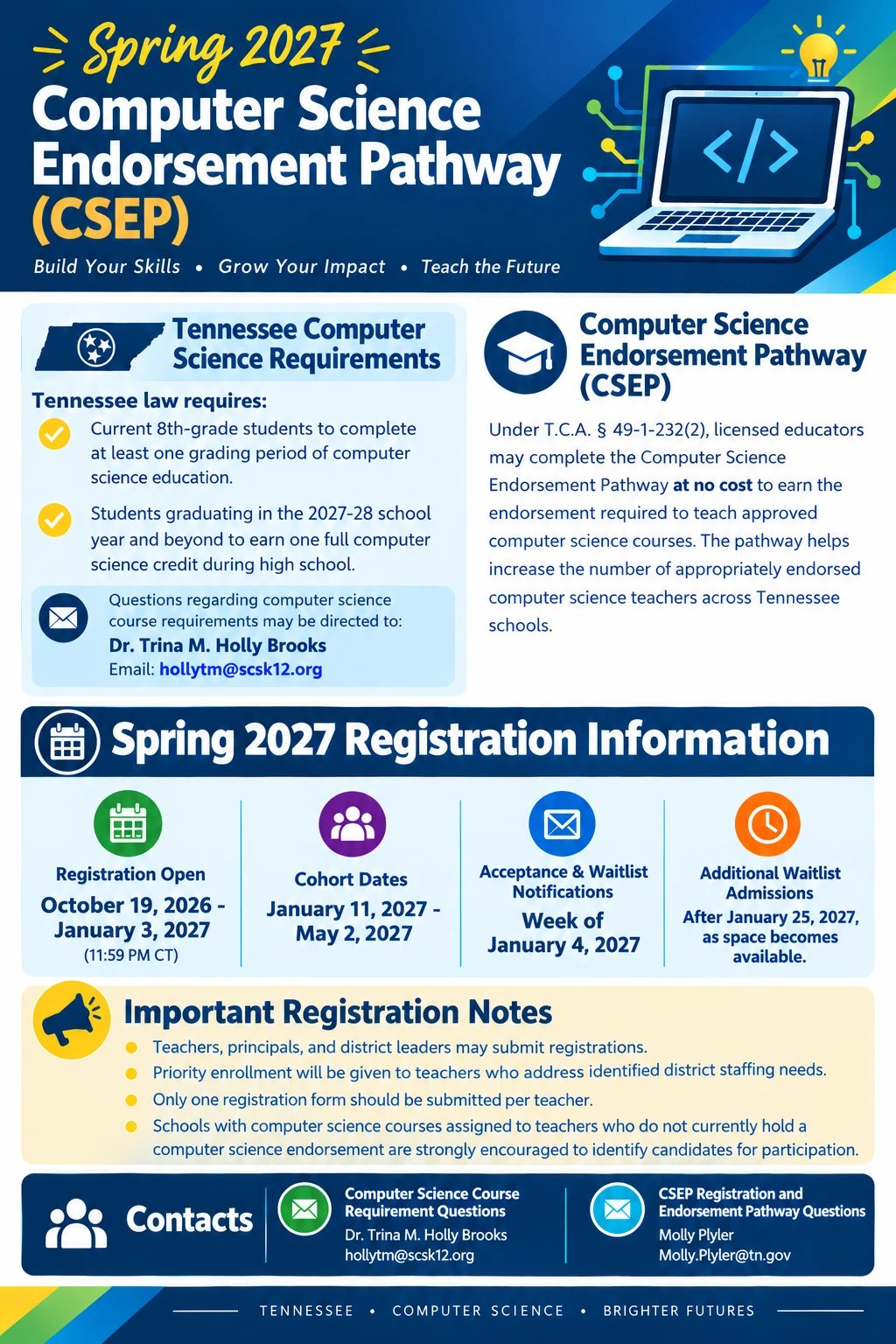
Tennessee law requires current 8th-grade students to complete a computer science course and the Class of 2028 to earn a computer science credit. Review the attached flyer for dates, registration details, and contacts. Encourage eligible teachers to register for the FREE Spring 2027 Computer Science Endorsement Pathway (CSEP).
Registration link: https://stateoftennessee.formstack.com/forms/csep_teacher_registration_form_spring_2027?mc_cid=203fb1ac6b&mc_eid=c59a22e222
The Federal Programs team will host a professional learning session, Title I Essentials - Quarter 2 on November 13 to ensure that each PLC Coach is equipped with essential information regarding both current and updated Title I guidelines, requirements, and compliance expectations.
Session details including time and location will be shared by your Federal Programs Advisor.
Expected Outcome: PLC Coaches will demonstrate knowledge of the identified focus areas and understand how to access available support, tools, and resources to ensure effective implementation of your schoolwide program, Title I requirements and compliance expectations.